An MCP server is a small program that exposes your internal tools and data to AI assistants through the Model Context Protocol, an open standard originated by Anthropic in late 2024. In TypeScript, the official SDK lets you register typed tools and serve them over stdio or HTTP in under two hundred lines. Build one when several assistants or teams need the same capabilities; a plain function-calling integration is often enough for a one-off. Below: the concepts, a working server, and how to test it.
What is the Model Context Protocol?
MCP is an open protocol that standardises how AI assistants call external tools and read external data. Anthropic published it in November 2024, and during 2025 it spread well beyond its origin: most major assistant ecosystems can now act as MCP clients. A server you write once serves all of them.
The analogy that stuck is the USB port. Before USB, every peripheral needed its own connector; before MCP, every assistant-to-system integration was bespoke glue code. With MCP, the assistant side implements a client, you implement a server, and the wire format (JSON-RPC 2.0) is fixed by the specification. The practical consequence: integration effort drops from N assistants times M systems to N plus M, and the server becomes the single place deciding what is exposed.
What are tools, resources and prompts?
MCP defines three primitives. Tools are functions the model may decide to call, described by a name, a description and a typed input schema. Resources are read-only data the client can load into context, addressed by URI. Prompts are reusable, parameterised templates that users invoke explicitly. Most business servers start with tools alone.
The distinction matters because control differs. The model chooses when to call a tool; the application or the user chooses which resources to attach and which prompts to run. So a tool named create_support_ticket writes to your systems on the model's initiative, while a resource like orders://recent only feeds context. Keep side effects in tools, keep reference data in resources, and write tool descriptions as carefully as public API documentation: they are the only thing the model reads before deciding.
Wondering which internal capabilities are worth exposing to an assistant? Describe your system: a one-page diagnosis within 48 hours.
Get my diagnosis →How do host, client and server fit together?
Three roles. The host is the AI application: a desktop assistant, an IDE, an agent runtime. Inside the host, an MCP client maintains one stateful connection per server. Your MCP server exposes tools and resources and talks to the real systems behind them. The model never touches your APIs directly; every call passes through this chain.
Two transports cover nearly every case. For local use, stdio: the host launches your server as a subprocess and exchanges JSON-RPC over stdin and stdout, with no network surface at all. For shared or remote deployments, streamable HTTP: one endpoint with streamed responses, behind your usual reverse proxy, carrying authentication (the specification recommends OAuth 2.1 for remote servers). Start with stdio; move to HTTP when more than one machine needs the server.
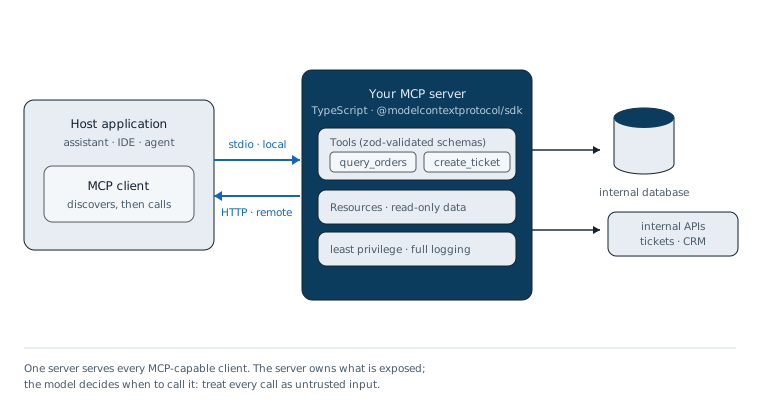
How do we build the server in TypeScript?
Install @modelcontextprotocol/sdk and zod, then register each capability on an McpServer instance. The SDK handles the protocol lifecycle, capability negotiation and message routing; you write only the handlers. Here is a working server exposing an order lookup, with the stdio bootstrap on the final line:
import { McpServer } from "@modelcontextprotocol/sdk/server/mcp.js";
import { StdioServerTransport } from "@modelcontextprotocol/sdk/server/stdio.js";
import { z } from "zod";

const server = new McpServer({ name: "orders", version: "1.0.0" });

server.registerTool(
  "get_order_status",
  {
    title: "Get order status",
    description: "Look up one order by reference (format ORD-123456).",
    inputSchema: {
      orderRef: z.string().regex(/^ORD-\d{6}$/, "Expected format ORD-123456"),
    },
  },
  async ({ orderRef }) => {
    // Read-only credential: this tool can never write
    const order = await ordersDb.findByRef(orderRef);
    if (!order) {
      return { content: [{ type: "text", text: `No order ${orderRef}` }], isError: true };
    }
    return { content: [{ type: "text", text: JSON.stringify(order) }] };
  },
);

// stdio bootstrap: the host launches this file and speaks JSON-RPC on stdin/stdout
await server.connect(new StdioServerTransport());
A second tool, create_support_ticket, follows the same shape: a zod schema (subject, order reference, severity as an enum), a handler that calls your ticketing API with a dedicated service account, and a text response carrying the ticket reference. Resources, prompts and the HTTP transport are documented in the TypeScript SDK repository.
Why do validation and least privilege matter so much?
Because the model decides when to call you, and with what arguments. An MCP tool call is machine-generated input influenced by everything in the model's context: user messages, retrieved documents, output of other tools. Treat every call as untrusted, exactly as you would a public endpoint, even when the host runs on a developer's laptop.
Concretely: validate with strict zod schemas (patterns, enums, length caps) rather than permissive strings; give each server credentials scoped to exactly what its tools do, read-only for lookups, a ticketing account that creates but never deletes; and log every call with arguments, outcome and duration. Prompt injection makes this tangible: a malicious document summarised by the assistant can try to steer the model into calling your tools, so the server must limit what is even possible. The same boundary rule runs through our article on adding AI to an existing backend: enforcement belongs in your code, never in the prompt.
How do we test it with the MCP Inspector?
The MCP Inspector is the official development UI: it connects to your server, lists tools, resources and prompts, and lets you fire calls with arbitrary arguments before any assistant is involved. One npx command against your built server gives you a browser interface immediately:
npx @modelcontextprotocol/inspector node dist/server.jsUse it for three checks. Schemas: an invalid order reference must be rejected with a readable message. Descriptions: a model with no other context should understand when each tool applies. Failure paths: verify what a timeout or an empty result looks like. Then connect a real host and watch when the model actually chooses your tools; Anthropic documents MCP connector configuration for its clients on docs.anthropic.com.
When should you not build an MCP server?
Not for every integration. When one application talks to one model provider for one workflow, plain function calling against your existing REST API is simpler: fewer moving parts, no extra process, no new protocol to operate. MCP pays off when the same capabilities must serve several assistants, teams, or hosts you do not control.
| Criterion | Plain function calling | MCP server |
|---|---|---|
| Reuse across assistants | Re-declared per app and provider | One server, every MCP-capable client |
| Discovery | Tool list hardcoded in your app | Listed by the client at connect time |
| Transport | Your own API plus custom glue | Standard stdio or streamable HTTP |
| Auth story | Whatever your app already does | Specified: OAuth 2.1 for remote servers |
| When it wins | One app, one provider, one workflow | Shared capabilities, several hosts or teams |
Our rule of thumb: first integration, function calling; second consumer of the same capability, promote it to an MCP server. Sequencing that migration, and deciding which capabilities deserve exposure at all, is part of our AI automation work.
Pre-launch checklist
- Tool inputs validated by strict zod schemas (enums, patterns, length caps)
- Credentials scoped per server: read-only wherever reading is enough
- Tool descriptions reviewed as model-facing documentation
- Every call logged with arguments, outcome and duration
- Schemas and failure paths exercised in the MCP Inspector
- stdio locally; authenticated streamable HTTP for anything shared