Adding Arabic to a French website is not a matter of translating the copy and flipping the margins. Right-to-left rendering touches layout, typography, numbers, forms, PDFs, and email, and each of these breaks in its own way. This site runs in three languages including Arabic, and we shipped a bilingual Arabic/English corporate site for an international EPC contractor. Here is what those projects taught us, including what we would not do again.
RTL is not a CSS mirror
The classic approach is to ship the LTR version, then spend a few days writing [dir="rtl"] rules that flip paddings by hand. You end up with a site that looks like RTL in a screenshot and degrades with every new feature, because every component now has to exist twice.
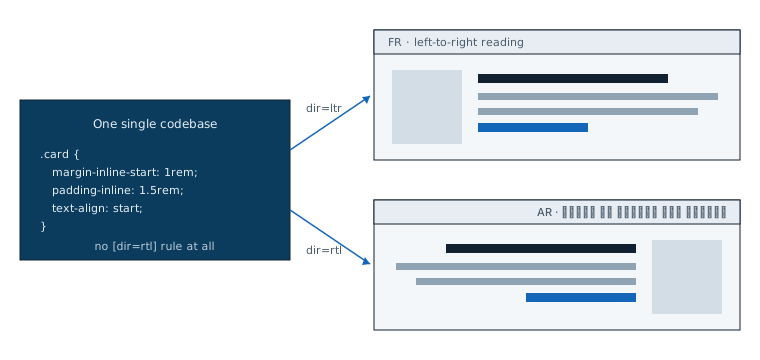
The right tool has existed for years: CSS logical properties. margin-inline-start replaces margin-left, inset-inline-end replaces right, text-align: start replaces text-align: left. The browser resolves the physical side from the document's direction, and a component written this way works in both directions without a single conditional rule.
/* Before: every rule must be duplicated */
.card { margin-left: 1rem; border-left: 3px solid; }
[dir='rtl'] .card {
  margin-left: 0; margin-right: 1rem;
  border-left: none; border-right: 3px solid;
}

/* After: one rule, valid in both directions */
.card {
  margin-inline-start: 1rem;
  border-inline-start: 3px solid;
  padding-inline: 1.5rem;
  text-align: start;
}
On the EPC project, the code review rule was simple: left and right are banned, except for things that do not depend on reading direction, like a geographic map or a video player. Set at the first commit, this constraint costs almost nothing. Retrofitting an existing site, on the other hand, means going back over every component one by one.
Watch out for the opposite trap: not everything should flip. A "back" arrow changes direction in Arabic, but a phone number, a code snippet, or a video playback progress bar stays LTR. The question to ask for each element is not "are we in RTL?" but "does this element follow the reading direction?"
Bidirectional text: where the algorithm betrays you
Real Arabic text is never purely Arabic. It contains Latin product names, acronyms, URLs, version numbers. The Unicode bidirectional algorithm decides on its own how to order these segments on screen, and it gets it wrong the moment punctuation is involved: a technology name at the end of an Arabic sentence, a number preceded by a "+", a parenthesis that jumps to the other side of the screen.
diron the document and on the islands.dir="rtl"on the page, then an explicitdir="ltr"on any block whose content is Latin: a code snippet, an email address, a product reference.<bdi>around injected values. A username or a company name pulled from a database can be Latin on an Arabic page, or the other way around.<bdi>isolates the segment and keeps it from distorting the punctuation around it.- Test with real mixed content. Fake, purely Arabic filler text reveals nothing. What breaks are Arabic sentences containing "Node.js 22" or "+33 6". Build a set of trap strings and keep it in your visual tests.
Dates, numbers, and currencies: do not hand-roll anything
The second source of bugs is formatting. Depending on the country, Arabic is written with Eastern Arabic digits (٠١٢٣) or Western digits (0123), the position of the currency symbol changes, and month names differ between the Maghreb and the Gulf. Any manual string concatenation will eventually produce an unreadable amount for someone.
Intl.NumberFormat and Intl.DateTimeFormat handle these cases correctly, provided you pass a full locale: ar-SA and ar-MA do not make the same choices, and a bare ar lets the engine decide for you. Which digits to use is an editorial decision more than a technical one: part of the Gulf audience, used to English-language interfaces, prefers Western digits. That is a question to settle with a speaker from the target market, not in code.
Arabic typography: your habits break the ligatures
Arabic is a cursive script: letters connect and change shape depending on their position within the word. Three concrete consequences for a stylesheet designed around Latin type:
letter-spacingis off limits. Elegant tracking on Latin capitals pulls Arabic letters apart and makes the word hard to read. Any global rule of that kind must be neutralized on Arabic pages.- Your Latin font is not enough. This site uses a variable font with a width axis for Latin; it does not cover Arabic. Arabic pages are served in Noto Sans Arabic, which, as we load it, has no width axis: visual hierarchy there relies on weight and size alone. Accept that the Arabic version will not have exactly the same typographic voice, rather than forcing a lower-quality font that "looks Arabic".
- Line heights move. Arabic has more prominent ascenders, descenders, and diacritics; a
line-heighttuned tightly for Latin clips them. Likewise, italics have no traditional equivalent in Arabic: emphasis is carried by weight.
Forms: the simplest field turns treacherous
A bilingual form concentrates every problem above into a few square inches:
- An email, URL, or phone field stays LTR even on an Arabic page:
dir="ltr"on the input, otherwise the cursor jumps around and the "+33" ends up on the wrong side. - A free-text field (name, message) must accept both directions:
dir="auto"lets the browser detect the direction from the first characters typed. - The browser's native validation messages appear in the user's system language, not the page's. For a consistent experience, client-side validation has to carry its own messages, translated and proofread like everything else.
- The placeholder follows the field's direction, not the page's: an Arabic placeholder in a field forced to LTR ends up left-aligned, which is immediately visible.
PDFs and email: everything starts over
The browser does an enormous amount of bidirectional work for you. Step outside it and that work disappears. PDF generation libraries handle Arabic letter joining unevenly: some render the characters disconnected, in the wrong order, or break lines on the wrong side. Email clients are worse still: patchy support for dir, restricted CSS, logical properties missing from several major clients.
A two-column Arabic transactional email is not a reasonable goal. Simplify the layout on these channels instead of fighting them.
Our practice: test the Arabic rendering of every output, PDF and email alike, on the actual target clients before going live, and treat these channels as deliverables in their own right, with their own acceptance testing.
The native Arabic-speaking reviewer is not optional
Last point, and the most important one. Machine translation, or even professional translation without review, produces text that is grammatically correct yet foreign: a register too literary for an interface, technical terminology sometimes transliterated and sometimes translated with no consistency, phrasing that reads like a calque of the French. Modern Standard Arabic is shared across all markets, but the lexical choices of a Moroccan reader and a Saudi reader do not always coincide, and you have to decide for your audience.
The native reviewer also catches what no non-Arabic-speaking eye ever will: a ligature broken by a forgotten CSS rule, punctuation displaced by the bidirectional algorithm, a wrong plural in a counter. A broken Arabic page "looks like Arabic" to anyone who cannot read it. That is exactly what makes this defect dangerous: nobody on a non-Arabic-speaking team will notice it before your users do.
Shipping a product in French and Arabic? Describe it: a one-page diagnostic within 48 hours.
Get my diagnostic →What we would not do again
- Adding RTL at the end of the project. It can be done, we have done it, but every component written without logical properties becomes debt to rework. The extra cost of RTL from the first commit is small; the cost of the retrofit is not.
- Signing off on screenshots. An RTL site is tested with keyboard and mouse: text selection, cursor position, tabbing through fields, carousels, scrolling. A screenshot shows none of that.
- Translating the interface without translating the rest. API error messages, transactional emails, notifications: the Arabic-speaking user sees them all, and a single message left in French is enough to break trust in how serious the Arabic version is.
The essentials
- Logical properties everywhere, physical properties banned in code review.
- Explicit
diron LTR islands,<bdi>on injected values. - Date, number, and currency formatting through
Intl, with a full locale. - A dedicated Arabic font, no
letter-spacing, hierarchy through weight. - Technical fields forced to LTR, free-text fields on
dir="auto". - PDFs and email tested as deliverables in their own right.
- Nothing goes live without review by a native Arabic speaker from the target market.
A bilingual French-Arabic website is an engineering project in its own right, not a translation checkbox ticked at the end. That is the exact scope of our bilingual and RTL applications offering: products that work in both reading directions from the first commit.